
Add a virtual number connection
Add number adds virtual numbers to a subscription, up to 10 at a time. You choose the period (monthly, quarterly, or annual), the country (UK or Australia), the area code, and the quantity. Each add is one period, one country, and one area code. A superadmin, or an admin assigned to the organisation, can add numbers. Members cannot.
How to add numbers to an active subscription
On an active subscription, Add number adds up to 10 virtual numbers for one period, one country, and one area code. Add 5 UK mobile numbers, then run Add number again for 3 Australia mobile numbers. Those numbers join the subscription already active for the period you choose, and they are charged on the card assigned to that subscription.
If the account has more than one organisation, check which organisation is selected. Numbers are added to that organisation.
- Sign in at portal.gosimless.com.
- Open Numbers, then Subscriptions, or start from the virtual number group on the dashboard.
- Select Add number on the subscription card for that period.
- Choose the period, country, area code, and a quantity of up to 10 for that country and area code.
- Confirm.
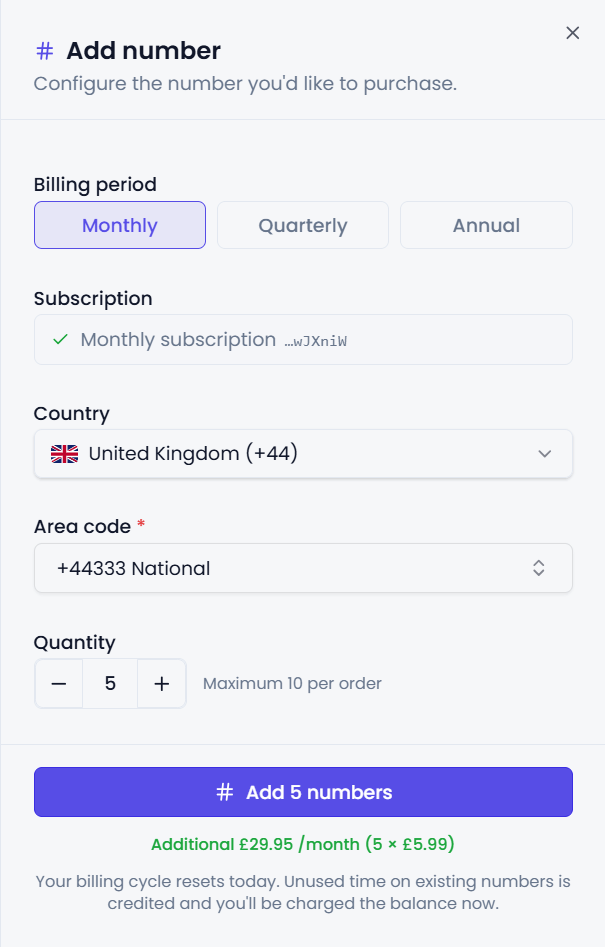
There is no further cap on how many numbers that subscription can hold. Run Add number again for the next batch of up to 10, or for another country or area code. Choosing a period that is not already active creates a new subscription for that period, with a quantity of 1. A card set on a different period is not used for this charge.
Subscription cards and cancellation are covered in Subscriptions.
When a new subscription is created
A new virtual number subscription is created when the period you choose does not already have an active subscription. The quantity starts at 1, and checkout accepts the payment method stored for the organisation or a new one. When no virtual number subscription is active, select Add number in the menu. That covers the first number, and a number added after cancellation. If another period is already active, open Add number on that card and choose the new period.
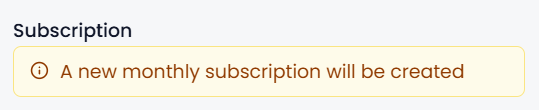
The screen shows that a new subscription will be created, for example "A new monthly subscription will be created". Further numbers for that period can be added later from the new card, up to 10 at a time. A second subscription is not created for a period that is already active.
| You already have | Period you choose | What happens |
|---|---|---|
| No active virtual number subscription | Monthly, quarterly, or annual | A new subscription is created for that period. The quantity starts at 1. This covers the first number, or a number added after the previous subscription was cancelled. Use Add number in the menu. |
| An active subscription for that period | The same period | The numbers join that subscription, up to 10 at a time. They are charged on the card assigned to that subscription. |
| An active subscription for a different period | A period that is not already active | A new subscription is created for the period you choose. The quantity starts at 1, and checkout accepts the stored payment method or a new one. |
Monthly, quarterly, and annual are separate subscription cards. Adding quarterly numbers while the only active subscription is annual creates a quarterly subscription. Later numbers for that period are added from the new card. How subscriptions are grouped on the dashboard is in Subscriptions.
Frequently Asked Questions
Can I add UK and Australia numbers in the same order?
Each Add number action is one country and one area code. Add the UK numbers first, confirm, then run Add number again for the Australia numbers. Both batches join the active subscription for that period when it is already active, up to 10 numbers on each add. Two UK area codes work the same way: finish one, then start another add. A new period still starts at a quantity of 1.
I already have an annual subscription. Where do quarterly numbers go?
Quarterly numbers do not join the annual subscription. Open Add number on the annual card and choose quarterly. That creates a new quarterly subscription. The quantity starts at 1, and checkout takes the payment method stored for the organisation or a new one. After it is active, further quarterly numbers are added from that card, up to 10 at a time. Monthly works the same way beside an annual card.
Why is the quantity 1 when I start a subscription?
A new subscription, including the first number and a number added after cancellation, starts with a quantity of 1. Checkout completes that subscription before more numbers are added. Use Add number in the menu when no virtual number subscription is active. When another period is already active, open Add number on that card and choose the new period. Once that subscription is active, Add number on its card accepts up to 10 numbers for the same period, country, and area code.
Will adding numbers move my renewal date?
Adding numbers to an existing active subscription resets the billing cycle to today. Unused time on the numbers already on that subscription is credited, and you are charged the balance immediately on the card assigned to that subscription. This applies when the numbers join a period that is already active. A brand-new subscription is completed at checkout instead, and its billing cycle starts then.
Which card is charged at checkout?
Checkout applies when a new subscription is created. It accepts the payment method stored for the organisation, or a new one you enter there. That choice applies only to the new subscription. A number that joins an active period is charged on the card assigned to that subscription. A card set on a different period is not used. Change a card later from Manage. See Payment method.
Can a member add a virtual number?
A member can view subscriptions for the organisation they are assigned to. Adding numbers, starting a subscription, and cancelling one are limited to a superadmin, or an admin assigned to that organisation. If you are a member, ask an admin or the superadmin to run Add number. Roles are set out in Users.
Our last virtual number subscription was cancelled. Where do I start?
Use Add number in the menu. There is no active subscription for the numbers to join, so a new subscription is created for the period you choose. The quantity starts at 1, and checkout accepts the payment method stored for the organisation or a new one. After checkout, add further numbers for that period from the new card, up to 10 at a time.
How many numbers can I add once the subscription is active?
Up to 10 numbers in one Add number action, for one period, one country, and one area code. Run Add number again for the next batch, or for a different country or area code. There is no further cap on how many numbers that subscription can hold, so split a larger order into groups of 10. Later numbers join the active subscription for that period. A second subscription for the same period is not opened.
Will a second monthly subscription be created if I add more monthly numbers?
Monthly numbers join the active monthly subscription. Another monthly subscription is not created while one is already active. Choose quarterly or annual when you need a different period. That period gets its own subscription, starting with a quantity of 1 and checkout. After it is active, further numbers are added from that card, up to 10 at a time. The same rule applies to every period: a matching active period receives the numbers.
I only need to remove one number. Should I cancel the subscription?
Cancelling from Manage releases every connection on that subscription immediately and permanently. Early cancellation is not refunded, and unused time is not pro-rated. To end one number and leave the rest, follow Release a virtual number. That number stays Released for 72 hours. If it is the only connection, releasing it cancels the subscription. Other periods stay on their own cards until you cancel them separately.