
Identify which number is ringing with call whisper
Call whisper is a short spoken message that you hear when you answer a forwarded call, before the caller is connected. It tells you which gosimless number the caller dialled, so you can answer in the right way. The caller does not hear it and hears ringing while it plays.
Call whisper is optional and free. It only plays on calls that use call forwarding. Other providers may call it a call announcement or a whisper message.
How call whisper works
Call whisper plays to whoever answers a forwarded call, then connects the caller. It helps most when several numbers forward to the same phone, because each number can announce itself.
- Someone calls your gosimless number.
- gosimless forwards the call to your destination phone.
- You answer and hear the whisper.
- The whisper finishes, and you and the caller are connected.
Where to configure it
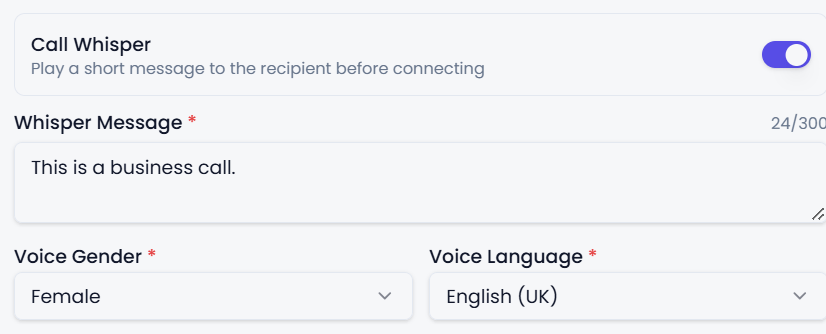
Call whisper is part of number configuration. Switch on Call Whisper, then set the message, voice gender, and language in either place:
- Number-level configuration: Portal → Numbers →
select virtual number→ Configuration Applies only to that number. - Reusable configuration: Portal → Numbers → Configurations →
select configurationA shared setup you can apply to several numbers.
You can use both: some numbers with their own whisper, and others sharing a reusable configuration.
How to disable call whisper
Call whisper is an on/off toggle. Turn it off in the same place you set it up.
- Number-level configuration: Portal → Numbers →
select virtual number→ Configuration → switch Call Whisper off, then save. Stops the whisper on that number only. - Reusable configuration: Portal → Numbers → Configurations →
select configuration→ switch Call Whisper off, then save. Stops the whisper on every number that uses that configuration.
Forwarded calls then connect as soon as you answer, with no announcement. Calls still forward to the same destination.
| Situation | Why turning it off helps |
|---|---|
| You expect a verification or 2FA call | The automated call can start reading the code before you are connected |
| Only one number forwards to your phone | You already know which number was dialled |
| Voicemail or another automated system answers at the destination | The whisper plays to the machine, not to a person |
Without call whisper, a forwarded call looks like any other call on your phone, so you answer without knowing which number was dialled.
Test the setup
Call the gosimless number from another phone and answer on your destination phone. Check that you hear the whole whisper, that it names the right line, and that the caller is connected when it finishes. If you have several numbers, test each one, and test again after every change.
When call whisper helps
Call whisper helps when you cannot tell from your phone which number a caller dialled. Forwarded calls often land on a mobile. In Ofcom's research with 1,021 UK small and medium businesses, published in July 2025, 88% used mobile network calls and 71% used them at least daily. Businesses preferred mobile and landline calls for sales and customer service calls (Ofcom, Business Call User Research, July 2025).
How you answer matters because many people still choose to phone. In a YouGov study published on 8 April 2025, 65% of Britons said they tend to contact businesses by phone. In a Zen Internet survey reported on 26 June 2025, 44% of UK consumers said calling is their preferred way to contact a business, and half said a phone call feels more personal (YouGov, 8 April 2025; Comms Business, 26 June 2025).
| Situation | Example whisper |
|---|---|
| Business and personal calls ring the same phone | "Business call" |
| Several businesses forward to one phone | "Smith Plumbing" or "Smith Consulting" |
| A separate number for each advert or listing | "Website number" or "Flyer number" |
| Calls forward to a colleague's phone | "Sales line" or "Support line" |
Write the whisper message
Type the words you want to hear, then choose a male or female voice and a language. Call whisper uses free text-to-speech, so there is nothing to record or upload.
The whisper is limited to 300 characters, but a few words is enough. The caller keeps hearing ringing until the whisper finishes, so a short whisper connects you sooner. Call whisper has its own text and voice settings, separate from any welcome message.
"Business line" or "WhatsApp number", so you know which number was dialled before you speak.If calls forward to someone else, tell them about the whisper. They need to let it finish before they greet the caller.
Frequently Asked Questions
Does call whisper cost anything?
No. Call whisper and its text-to-speech voice are free. The forwarded call itself is charged as normal, from £0.05 a minute depending on the destination, in 1-minute increments. See virtual call pricing.
Does turning off call whisper stop call forwarding?
No. Call forwarding and call whisper are separate settings. Turning off the whisper only removes the announcement. Calls still forward to the same destination and connect as soon as you answer.
Does call whisper play on WhatsApp calls?
No. WhatsApp calls go through the app, not through call forwarding, so the whisper does not play on them. Call whisper plays only on phone calls that gosimless forwards to your destination number.
Should I use call whisper on a number I mainly use for WhatsApp Business?
Usually not. If the number mostly receives WhatsApp messages and verification codes, a whisper adds little and can get in the way of automated verification calls. Turn it off, and switch it back on if you start forwarding regular calls from that number.
Does call whisper work if I forward to a landline or a colleague's phone?
Yes. The whisper plays to whoever answers the forwarded call, on whichever phone number you forward to. Tell anyone who answers your forwarded calls to wait for the whisper to finish before they greet the caller.
What happens if my voicemail answers the forwarded call?
The whisper plays to your voicemail, not to you, so you will not hear it. If your destination phone often goes to voicemail, the whisper adds little. Consider turning it off for that number.
Why can't I hear the whisper?
Check that Call Whisper is switched on for that number, and that the number uses call forwarding, not a welcome message. If the forwarded call is answered by voicemail or another automated system, the whisper plays to that system instead of to you.
Can each number have a different whisper?
Yes. Give a number its own whisper in its number-level configuration, or share one whisper across several numbers with a reusable configuration. Each can have its own text, voice gender, and language.
Can I record my own voice for the whisper?
No. gosimless uses text-to-speech for call whisper, so there is no recording to make or upload. Type the words, choose a voice and language, and save. See text-to-speech.
Is call whisper the same as call screening?
Not quite. Call whisper plays an announcement to you before the caller is connected. Call screening usually also lets you accept or reject the call, for example by pressing a key. gosimless call whisper is an announcement only.
Call Forwarding
Forward calls from your gosimless number per number or with a shared configuration. Billed per minute from £0.05, or use a free welcome message.
Welcome Message
A welcome message plays a spoken greeting to callers, then ends the call. It is free, and it replaces call forwarding on that number.