
Manage gosimless subscriptions
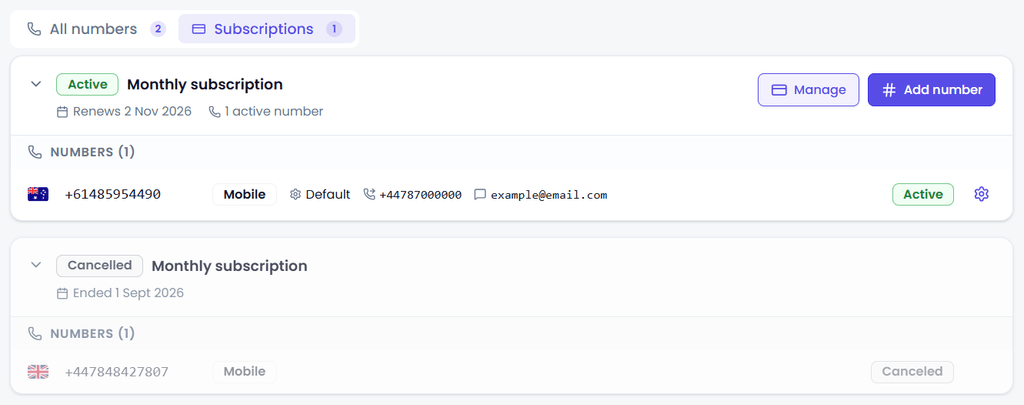
Active subscriptions are on the [portal.gosimless.com](https:// portal.gosimless.com) dashboard, grouped by product type, such as virtual numbers and eSIMs. Open the same list from the menu under Numbers or eSIMs, then the Subscriptions tab. Each card has Manage and Add number or Add eSIM at the top right. Manage changes that subscription's [payment method](/ help/account-and-billing/payment-method) or cancels it. Confirming cancellation immediately and permanently releases every connection on that subscription.
Where to see active subscriptions
Active subscriptions are listed on the portal dashboard, and the same lists are in the menu under Numbers or eSIMs, then the Subscriptions tab. Virtual number subscriptions are separate cards for monthly, quarterly, and annual, and eSIMs appear in their own group on one subscription.
A connection is a virtual number or an eSIM held on a subscription. If the account has more than one organisation, check which organisation is selected. Cancelled subscriptions are listed under Numbers or eSIMs, then Subscriptions.
How to cancel a subscription
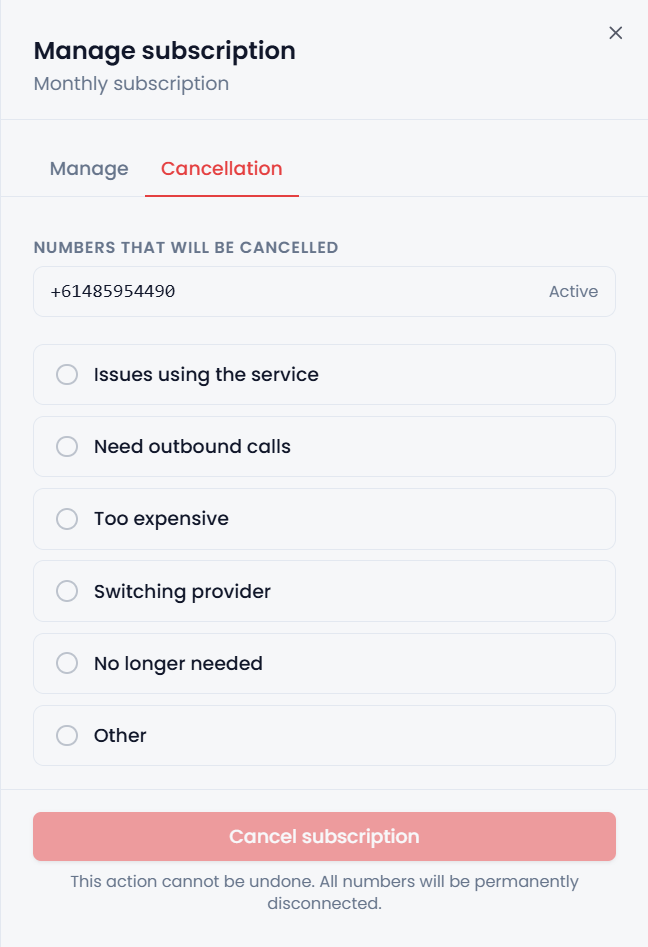
Cancellation is started from Manage on that subscription's card, and confirming it immediately and permanently releases every connection on that subscription after you select a reason. Other subscriptions stay in place and need to be cancelled separately following the same process. Early cancellation is not refunded, and unused time in the period is not pro-rated.
- Sign in at portal.gosimless.com as a superadmin or an admin assigned to the organisation.
- Open the dashboard, or open Numbers or eSIMs and then Subscriptions.
- On the subscription you want to end, select Manage.
- Choose the Cancellation tab.
- Select the reason you are cancelling.
- Confirm cancellation.
After you confirm, that subscription is listed under Numbers or eSIMs, then Subscriptions with Cancelled status.
Cancelling a subscription cancels every connection tied to it. The Cancellation tab lists those connections before you confirm. To disconnect one virtual number and leave the rest of the subscription in place, follow the Release a virtual number guide. To disconnect one eSIM, follow the Disconnect eSIM guide.
If you cannot use the service because of a technical fault, for example the number does not work, contact hello@gosimless.com before you treat it as a normal cancellation. gosimless will resolve the fault or process a full refund of the affected charge. Choosing to cancel early, with the service working, does not produce a pro rata refund.
The Cancellation tab asks for a reason, listed below.
| Reason | Virtual numbers | eSIMs |
|---|---|---|
| Issues using the service | Support can help troubleshoot the issue or provide a refund for faulty services, contact hello@gosimless.com | Support can help troubleshoot the issue or provide a refund for faulty services, contact hello@gosimless.com |
| Need outbound calls | UK eSIM plans include outbound calls and SMS. gosimless can port the virtual number to an eSIM, contact hello@gosimless.com | Virtual number subscriptions only |
| Too expensive | A discount may be available, contact hello@gosimless.com | A discount may be available or the eSIM number can be ported to a cheaper virtual number subscription, ontact hello@gosimless.com |
| Switching provider | Optional, let us know who you are switching to | Optional, let us know who you are switching to |
| No longer needed | Optional, let us know what changed | Optional, let us know what changed |
| Other | Optional, add any feedback | Optional, add any feedback |
How to change the payment method
The payment method charged for a particular subscription is changed from Manage, then Update payment method. Only a superadmin, or an admin assigned to the organisation, can change the payment method.
- Sign in and open the subscription from the dashboard, or from Numbers or eSIMs, then Subscriptions.
- Select Manage, then Update payment method.
- Enter the new card and save it.

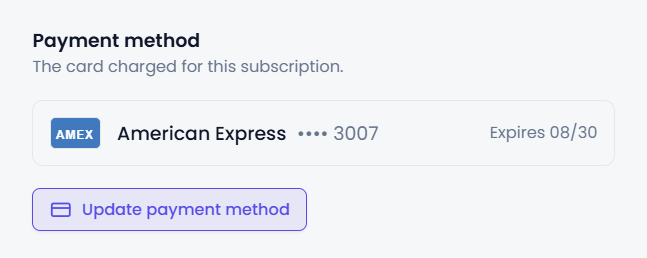
When the card is expired or due to expire, the email sent one week before renewal includes a link that updates this same subscription. Full steps for the subscription card, the email link, and the organisation default are in the Payment method guide.
How to manage connections
A connection is one virtual number or one eSIM on a subscription. Add a connection when the subscription should gain a number or an eSIM, and release or disconnect one connection when that service should end and the rest of the subscription should stay. Virtual numbers and eSIMs are managed separately. Ending the last connection on a subscription cancels that subscription.
Manage virtual number connections
Add virtual numbers with Add number, or end one number with Release number. A number joins the active subscription for its period, or starts a subscription when that period is not already active. A released number stays Released for 72 hours, and emailing hello@gosimless.com in that time can reconnect it. Full steps are in Add number.
How to add a virtual number connection
Add number adds virtual numbers to a subscription, up to 10 at a time. An eSIM add chooses a mobile plan and network. A virtual number add chooses the period (monthly, quarterly, or annual), the country (UK or Australia), the area code, and the quantity. Each add is one period, one country, and one area code - for example, add 5 UK mobile numbers, then run Add number again for 3 Australia mobile numbers. See the Add number guide for further information.
- Sign in at portal.gosimless.com.
- Open Numbers, then Subscriptions, or start from the virtual number group on the dashboard.
- Select Add number. Use the button on the subscription card when that period is already active. Use Add number in the menu when there is no active virtual number subscription.
- Choose the period, country, area code, and a quantity of up to 10 for that country and area code.
- Confirm.
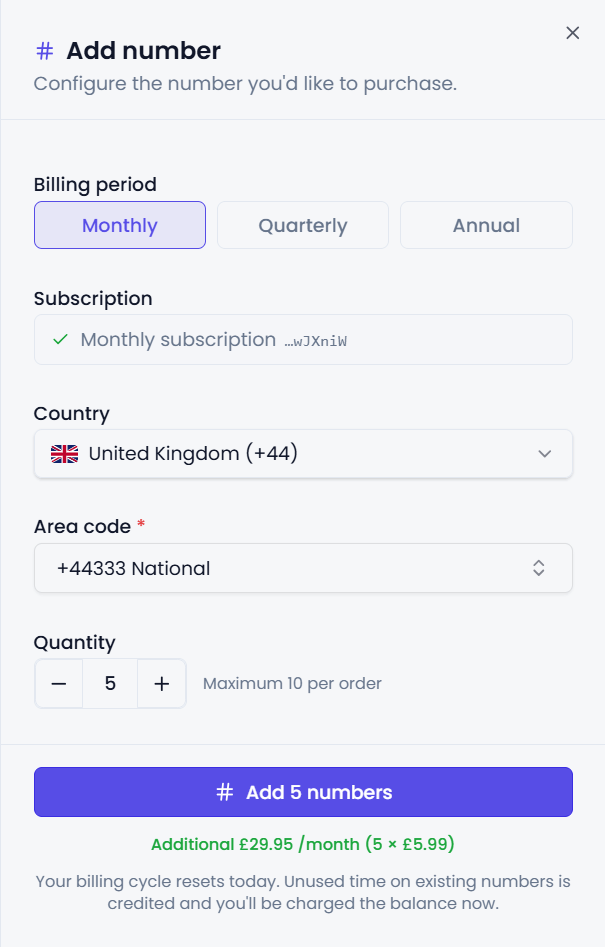
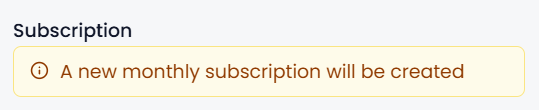
A new virtual number subscription is created when the period you choose does not already have an active subscription. Numbers for a period that is already active join that subscription. To set up a new subscription, click Add number in the menu. Whenever a new subscription is created, the quantity is intially limited to 1. The screen shows that a new subscription will be created, for example "A new monthly subscription will be created". Checkout accepts the payment method stored for the organisation, or a new one. Further numbers for that period can be added later, up to 10 at a time. The table below provides examples.
| You already have | You add | What happens |
|---|---|---|
| An active monthly subscription | A monthly number | The number is added to that monthly subscription |
| An active monthly subscription | A quarterly or annual number | A new subscription is created for that other period |
| An active subscription for every period you need | Another number on one of those periods | It is added to the matching subscription |
| No virtual-number subscription | A first number | Use Add number in the menu to start the subscription |
How to release a virtual number connection
Release one virtual number from the subscription card on the dashboard, or from Numbers, then All numbers. Expand the subscription card to see its active connections. On the number, select the gear icon, open the Cancellation tab, choose a reason, and select Release number. The reasons are the same as those for cancelling a virtual number subscription.
- Sign in at portal.gosimless.com
- Expand the subscription card on the dashboard, or open Numbers, then All numbers
- On the number, select the gear icon
- Open the Cancellation tab
- Select a reason
- Select Release number
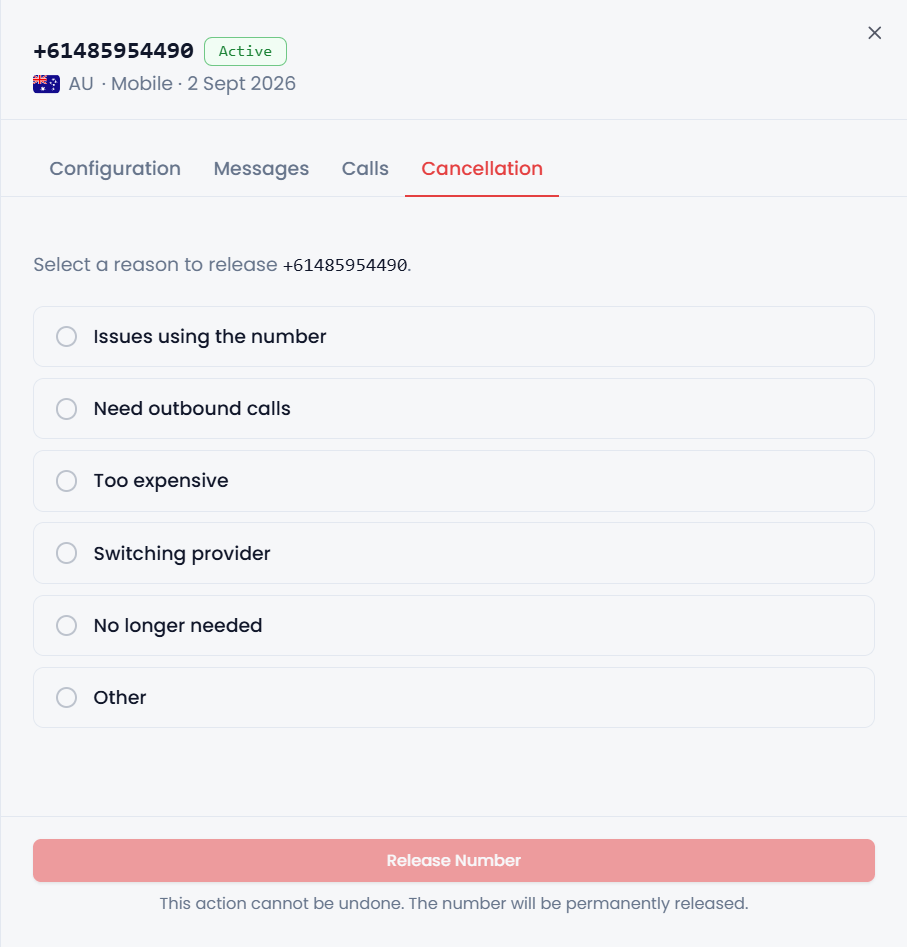
The number stays Released for 72 hours. Email hello@gosimless.com within those 72 hours if the release was a mistake or you change your mind, and the number can be reconnected. After 72 hours the number is disconnected permanently, and that disconnection is irreversible.
Can I keep my virtual number?
To keep the number and take it to another provider, email hello@gosimless.com for a PAC while the number is still active. gosimless sends the PAC by email within one business day. The number is released from the subscription once the port out is complete. A PAC cannot be issued for a number that is Released, or for a number on a cancelled subscription. See the Porting guide for more information.
Manage eSIM connections
Add eSIMs with Add eSIM, or end one eSIM with Disconnect eSIM. Every plan, on O2 or Vodafone, sits on the one eSIM subscription. Disconnecting an eSIM is immediate and permanent, with no 72-hour period to reconnect it. To keep the mobile number, follow Porting while the eSIM is still active. Adding steps are in Add eSIM. Disconnecting steps are in Disconnect eSIM.
How to add an eSIM connection
Add eSIM on an existing eSIM subscription adds those eSIM connections to that subscription, up to 10 at a time. Every eSIM plan sits on that one subscription, regardless of the network it uses, so an O2 plan and a Vodafone plan do not require separate eSIM subscriptions. See the Add eSIM guide for further information.
- Sign in at portal.gosimless.com.
- Open eSIMs, then Subscriptions, or start from the eSIM group on the dashboard.
- On the eSIM subscription card, select Add eSIM.
- Choose up to 10 connections and confirm.
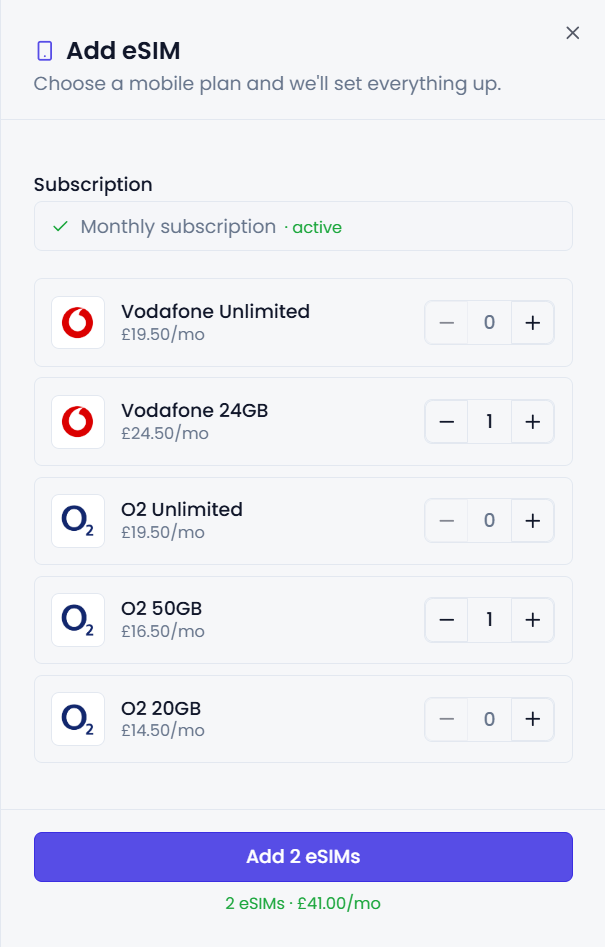
When there is no active eSIM subscription, use Add eSIM in the menu. This covers the first eSIM to be provisioned or an eSIM added after the previous eSIM subscription was cancelled. The screen will show "A new monthly subscription will be created", and the quantity is initially limited to 1 connection. You will then be redirected to a checkout page to complete payment, where you can use the payment method already stored for the organisation or a new payment method. Once the eSIM subscription is active, further eSIMs can be added including a different network or data allowance.
How to disconnect an eSIM connection
Disconnect one eSIM from the subscription card on the dashboard, or from eSIMs in the menu. Expand the subscription card to see its active connections. On the eSIM, select the gear icon, open the Cancellation tab, choose a reason, and confirm. The reasons are the same as those for cancelling an eSIM subscription.
- Sign in at portal.gosimless.com
- Expand the eSIM subscription card on the dashboard, or open eSIMs and the list of connections
- On the eSIM, select the gear icon
- Open the Cancellation tab
- Select a reason
- Select Disconnect eSIM
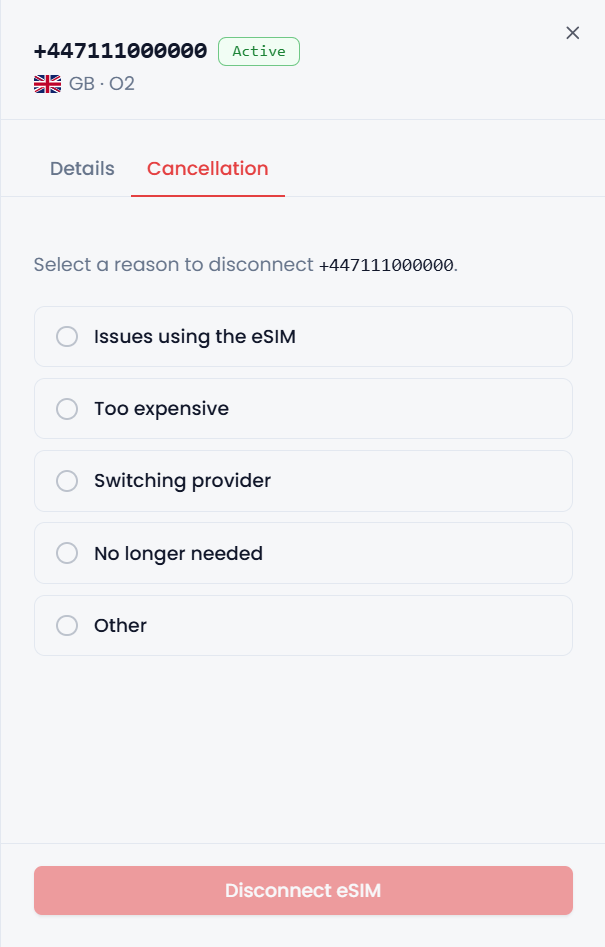
Can I keep my eSIM number?
To keep the eSIM number and take it to another provider, email hello@gosimless.com for a PAC while the number is still active. gosimless sends the PAC by email within one business day. The eSIM number is released from the subscription once the port out is complete. A PAC cannot be issued for an eSIM number that is Disconnected status, or for a number on a cancelled subscription. See the Porting guide for more information.
Who can manage a subscription
A superadmin can add connections and cancel subscriptions for every organisation, and an admin can do that for organisations they are assigned to. A member user can view the account and cannot add connections, start a subscription, or cancel one, because those actions create charges or permanently release connections.
| Action | Superadmin | Admin | Member |
|---|---|---|---|
| View active subscriptions | Yes | Yes, assigned organisation | Yes, assigned organisation |
| Add up to 10 connections | Yes | Yes, assigned organisation | No |
| Start a subscription for a new service | Yes | Yes, assigned organisation | No |
| Change the card on one subscription from Manage | Yes | Yes, assigned organisation | No |
| Cancel a subscription | Yes | Yes, assigned organisation | No |
Cancelling is permanent for the connections on that subscription. Limit subscription management to people who are allowed to take action which impacts service, billing and payments.
Frequently Asked Questions
Can I open a second monthly subscription for virtual numbers?
A monthly number joins the active monthly subscription. Another monthly subscription is not created while one is already active. Quarterly or annual gets its own subscription, starting with a quantity of 1 and checkout. After that subscription is active, further numbers for the period are added up to 10 at a time. eSIMs do not use this period split. They share one subscription.
What happens to annual numbers if I cancel the monthly subscription?
Cancelling the monthly subscription disconnects every connection on that card immediately and permanently. An annual virtual-number subscription, and the eSIM subscription, stay active until you cancel those cards from their own Manage buttons. Releasing one number is different: that number stays Released for 72 hours. Check the card title and billing period before you confirm. Download invoices for the subscription you are ending if finance needs them.
Can I remove one number and keep the rest?
Manage cancels every connection on the subscription. To end one virtual number and leave the rest, follow Release a virtual number. That number stays Released for 72 hours. To end one eSIM, follow Disconnect eSIM. That disconnection is immediate and permanent. If the connection you end is the last one, the subscription is cancelled.
Can I get a number back after I confirm cancellation?
Releasing one virtual number keeps it in Released status for 72 hours. Email hello@gosimless.com within that time if the release was a mistake or you change your mind, and the number can be reconnected. After 72 hours the disconnection is permanent. Disconnecting an eSIM is immediate and permanent, with no 72-hour window. Cancelling a subscription disconnects every connection on it immediately. A PAC cannot be issued once the number is released, disconnected, or the subscription is cancelled.
How do I add the 11th number?
Add up to 10 connections in one action, then run Add number or Add eSIM again for the next batch. There is no further cap on how many connections a subscription can hold. Further monthly numbers, and further eSIMs, still join the existing subscription. They do not open a new one. If the form blocks a larger batch, split it into groups of 10.
We have numbers and want eSIMs for the first time. Which button is that?
Use Add eSIM in the menu. The screen shows that a new monthly subscription will be created, and the quantity is 1. Checkout accepts the payment method stored for the organisation, or a new one. After that subscription is active, further eSIMs join it, up to 10 at a time, on any network. Add number on a virtual-number card only adds numbers.
Is an early cancellation refunded?
Early cancellation is not refunded, and unused days in the period are not pro-rated. The connections on that subscription are still disconnected immediately and permanently. Releasing one number, or disconnecting one eSIM, also has no pro rata refund. The exception is a legitimate service issue, such as a technical fault that stops you using the service. Contact hello@gosimless.com. gosimless will fix the fault or refund that charge in full.
Who is allowed to press Manage?
A superadmin can manage subscriptions on every organisation. An admin can manage them on the one organisation they are assigned to. A member cannot add, release, disconnect, or cancel. Ask an admin or the superadmin if a connection should be added or a subscription should end. Manage is also where that subscription's payment method is updated.
Will a new number use the card I set on a different subscription?
A number joins the subscription for its period and is charged on the card assigned to that subscription. A card set on a different period is not used. When that period has no active subscription, checkout accepts the payment method stored for the organisation, or a new one. Change a card later from Manage, or from the link in the card email. See Payment method.
Can I move a subscription to our other organisation instead of cancelling?
gosimless can move a virtual number or an eSIM from one organisation to another. The subscription itself stays where it is. The connection is added to an existing subscription on the organisation it moves to, or a new subscription is created there. Email hello@gosimless.com and name both organisations and the connection. Cancelling releases the connections and does not transfer them.
What should I choose as the cancellation reason?
Select the reason that matches why the subscription should end. Issues using the service and Too expensive are reasons to contact hello@gosimless.com before you confirm. Virtual number subscriptions also include Need outbound calls. If you need to keep the number, ask for a PAC instead of confirming. Switching provider, No longer needed, and Other include an optional note. Confirm only when every connection on that card should end.