
Forward SMS from your gosimless number to your email
SMS forwarding sends texts received on your gosimless mobile number to an email address you choose, so you can read them, including verification codes, without a second phone. It is free, and you can set it up on a single number or in a shared configuration that applies to several numbers.
Every text is saved in the portal, whether it is forwarded or not. If you switch SMS forwarding off, you can still read your texts in the portal.
How SMS forwarding works
SMS forwarding emails each text that arrives on your gosimless number to the address you set. The email includes the message, the time it arrived, the sender, and the gosimless number that received it.
- Someone texts your gosimless number.
- gosimless saves the text in the portal.
- If SMS forwarding is on, gosimless emails the text to your forwarding address.
Texts are still part of everyday phone use. In Ofcom's 2025 Technology Tracker, 96% of people aged 16 and over in the UK who use a mobile phone said they use it to send or receive text messages (Ofcom, Technology Tracker 2025, core data tables).
Choose per-number or shared configuration
Use a per-number configuration when one number needs its own forwarding address. Use a shared configuration when several numbers should forward texts to the same address, so you only change the settings once. Both use the same settings.
| Per-number configuration | Shared configuration | |
|---|---|---|
| Where | Numbers → gear icon next to the number → Configuration tab | Numbers → Configurations |
| Applies to | That number only | Every number assigned to it |
| Changing the email address | Edit each number | Edit once, and every assigned number updates |
| What you see on the number | An Override active message | The configuration selected under Saved Configuration |
| Good for | A number whose texts go to a different inbox | Several numbers whose texts go to the same inbox |
You can use both across your account. For example, two numbers can forward texts to their own inboxes while eight others share one configuration.
Set up SMS forwarding on one number
Per-number SMS forwarding applies only to the number you edit, and it replaces any shared configuration on that number.
- In the portal, go to Numbers.
- Select the gear icon next to the number.
- Open the Configuration tab.
- In the SMS forwarding settings, switch SMS forwarding on.
- Enter the email address that should receive your texts.
- Save your changes.
The Configuration tab now shows an Override active message. This means the number uses its own settings instead of a shared configuration.
Set up SMS forwarding with a shared configuration
A shared configuration lets several numbers forward texts to the same email address. You set it up once and assign it to each number.
- In the portal, go to Numbers → Configurations.
- Select an existing configuration, or create a new one.
- In the SMS forwarding settings, switch SMS forwarding on.
- Enter the email address that should receive your texts.
- Save your changes.
Assign a shared configuration to a number
Assign a shared configuration to make a number follow its settings. Assigning it removes any per-number settings on that number.
- Go to Numbers and select the gear icon next to the number.
- Open the Configuration tab.
- Choose the configuration from the Saved Configuration drop-down.
- Select Assign.

Turn off SMS forwarding
Switch SMS forwarding off when you do not want texts emailed to you. gosimless keeps saving every text in the portal, so you can still read them there.
- Open the number's Configuration tab, or the shared configuration under Numbers → Configurations.
- Switch SMS forwarding off.
- Save your changes.
Turning it off in a shared configuration stops the emails for every number assigned to that configuration.
SMS forwarding pricing
SMS forwarding is free. Inbound texts to a gosimless virtual mobile number are included in your subscription, with no charge per message, and forwarding them to email costs nothing extra. See virtual SMS pricing.
| Item | Cost |
|---|---|
| Inbound SMS to a virtual mobile number | Unlimited, included |
| SMS forwarding to email | Free |
| SMS log in the portal | Free |
Virtual number subscriptions start at £5.99 a month.
View your SMS log
The SMS log shows every text to and from your gosimless numbers, whether it was forwarded to email or not. Open it for all your numbers at once, or for a single number.
| To see texts for | Go to |
|---|---|
| All your numbers | Numbers → Messages |
| One number | Numbers → gear icon next to the number → Messages tab |
Both views have the same two tabs.
Table tab: lists each message. Search by number, filter by direction or type, and expand a row to read the message itself. Each message shows:
| Field | What it shows |
|---|---|
| Date/time | When the message was sent or received |
| Type | SMS or MMS |
| Direction | Inbound or Outbound |
| From | The sender's number or name |
| To | The number that received it |
| Parts | How many parts the message was split into |
| Cost | What the message was charged |
| Content | The message text, shown when you expand the row |
A long text is sent in parts. One part holds up to 160 standard characters, or 70 characters if the text includes emoji or some accented and non-Latin letters. Longer texts are split into parts of 153 or 67 characters, and your phone or the portal joins them back together (Twilio, How long can a message be?).
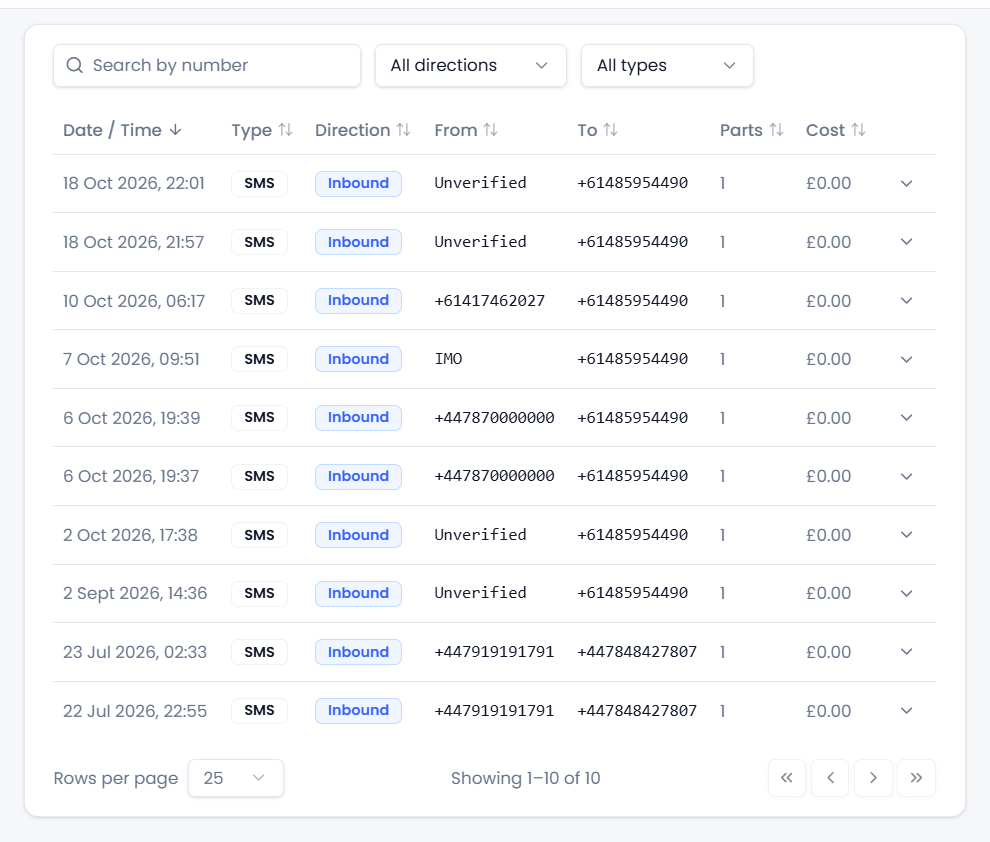
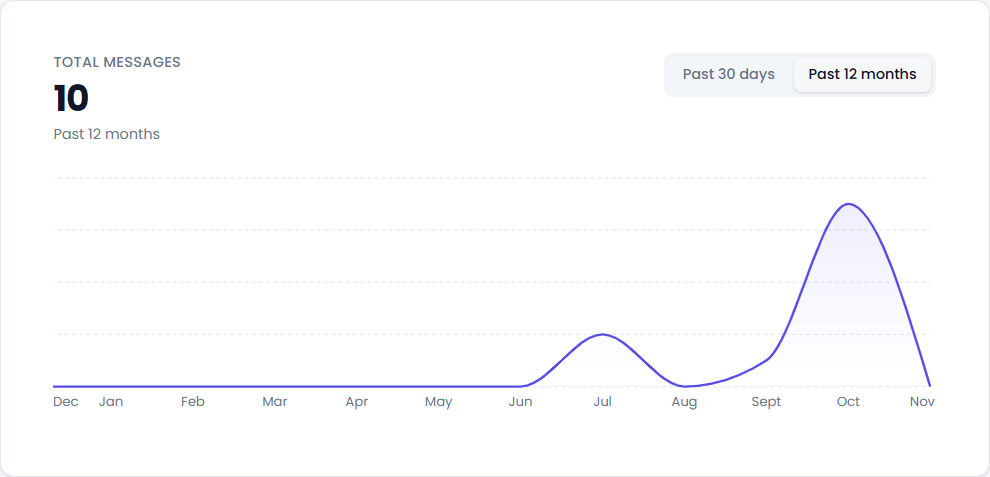
Chart tab: shows a line chart of the number of messages over the past 30 days or the past 12 months.
Spam and verification codes
gosimless filters spam texts, so genuine messages and verification codes are easier to find. Scam texts are still common. In research published by Ofcom in July 2026, 40% of UK mobile users said they had received at least one suspicious text in the previous three months, down from 50% in 2025. Ofcom estimates around 100 million suspicious messages a year still reach UK mobile users (Ofcom, Combatting mobile messaging scams statement, 15 July 2026).
gosimless mobile numbers receive verification, two-factor authentication (2FA), and one-time passcode (OTP) texts, including from short codes, sender names, and other countries. Some services are not supported, to protect the privacy and security of customers and the integrity of the numbers:
- Gambling and dating services
- Crypto services
- Certain consumer and non-business services
- Some banking services
If a service cannot text your number, choose its voice call option instead and set up call forwarding, so the call reaches your phone.
Test the setup
Text your gosimless number from another phone. Check that the email arrives at your forwarding address, and that the text also appears in Numbers → Messages. If you use a shared configuration, test one number from each configuration after every change.
Frequently Asked Questions
Can I forward texts to a phone instead of email?
No. SMS forwarding sends texts to an email address only. You can read them on any phone with that email account, and every text is also saved in the portal under Numbers → Messages.
Are texts saved if I turn off SMS forwarding?
Yes. gosimless saves every text in the portal, whether it is forwarded or not. With forwarding off, open Numbers → Messages, or the Messages tab on the number, and expand a row to read the message.
Is there a limit on how many texts I can receive?
No. Inbound texts to a gosimless virtual mobile number are unlimited and included in your subscription, with no charge per message. Forwarding them to email is also free. See virtual SMS pricing.
Can a UK landline number receive texts?
No. gosimless UK landline numbers are voice only and cannot receive texts, so SMS forwarding is not available on them. Choose a virtual mobile number if you need to receive texts or verification codes.
Can I receive texts from short codes and other countries?
Yes. gosimless mobile numbers receive texts from short codes, alphanumeric sender names such as a company name, and international numbers. A few services are not supported for verification codes, including gambling, dating, crypto, and some banking services.
Why has my verification code not arrived?
First check Numbers → Messages, because the text may be in the portal even if the email has not arrived. Then check your email's spam or junk folder. If the service is on the unsupported list, or cannot text your number, use its voice call option with call forwarding.
How do I stop forwarded texts going to junk?
Mark one forwarded email as "not junk" or "not spam" in your email account, and add the sender to your contacts or safe senders list. Future texts should then reach your inbox. They are always in the portal as well.
How do I change the email address texts go to?
Edit the email address where SMS forwarding is set. For a number with Override active, change it on that number's Configuration tab. For a shared configuration, change it under Numbers → Configurations, which updates every number assigned to it.
What does "Override active" mean?
The number uses its own per-number settings instead of a shared configuration. Changes to shared configurations do not affect it. To make the number follow a shared configuration again, choose it from Saved Configuration and select Assign, which resets the override.
Can I use SMS forwarding and call forwarding on the same number?
Yes. SMS forwarding and call forwarding are separate settings in the same configuration. Texts go to your email address for free, and calls go to your Forward Number, charged per minute from £0.05.
Configuration
Set call forwarding, SMS forwarding, welcome messages, and call whisper on one number or in a shared configuration, and choose a default for new numbers.
Call Forwarding
Forward calls from your gosimless number per number or with a shared configuration. Billed per minute from £0.05, or use a free welcome message.