
Manage multiple organisations
One gosimless account can hold several organisations. Each organisation is a separate legal entity with its own billing information, payment method, subscriptions, and users. They sit under one master account. The single superadmin creates organisations and requests deletion by emailing hello@gosimless.com. A superadmin, or an admin assigned to that organisation, updates its details through billing information.
What an organisation is for
An organisation is the billing and subscription boundary for one legal entity inside your master account, with its own legal name, contact details, email, and address. Invoices, the payment method, and subscriptions for that entity stay on that organisation, so a separate legal entities (e.g. business or person) does not have to share the same details.
Use a separate organisation when the legal entity identified in the invoices should be distinct. A second virtual number for the same company can stay on the existing organisation. Creating an organisation does not by itself buy a number or an eSIM. Connections and subscriptions are added afterwards by a superadmin or by an admin assigned to that organisation.
The first organisation is created at checkout from the billing details and email you enter. Further organisations are added later by the superadmin. One account can hold any number of organisations. A new organisation can be saved before a payment method is added. The payment method is collected when you set up a service and create a subscription.
How to create an organisation
The superadmin creates an organisation from the signed-in account at portal.gosimless.com, and the new organisation needs its own legal and billing identity because invoices will be issued to it. Admin and member users can't create an organisation.
- Sign in as the superadmin.
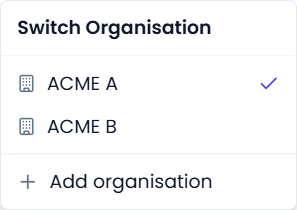
- Select the organisation switcher at the top right of the screen.
- Select Add organisation, then enter the legal and billing details, including the name, company name, contact details, email, and address.
- Add a payment method when you set up a service and create a subscription. The organisation can be saved before that.
- Add connections and subscriptions on that organisation, or assign an admin who will do that work.
Use the legal name your finance team expects on the invoices. You can correct name, contact number, email, and address later in Billing information.
How to update an organisation
Organisation details that appear on invoices are updated in the portal under the menu, then Billing, then Billing details, by the superadmin or by an admin assigned to that organisation. See the Billing information guide for further information. Member users cannot save changes on that screen, so a wrong address or billing email has to be corrected by an admin assigned to the organisation, or by the superadmin, before the next invoice is issued.
How to delete an organisation
To delete an organisation, the superadmin emails hello@gosimless.com. The organisation then becomes read-only: all of its users are deleted, all of its services are terminated immediately, and gosimless retains the historical records for legal, regulatory, and tax reasons.
gosimless can share access to the invoices and receipts. The master account remains, including any other organisations linked to it. An admin or member user cannot delete an organisation.
How to work across more than one organisation
The superadmin manages every organisation from the one master account, and an admin works in the organisations they are assigned to, with billing, invoices, subscriptions, and connections shown for the organisation in context. The organisation switcher is at the top right of the screen. Sign in once at portal.gosimless.com. You do not create a second gosimless login for each legal entity.
When you check an invoice total or a payment card, confirm which organisation is selected so you do not update the wrong entity. Spend analytics in Billing follow the organisation you are viewing. See Billing information.
When the same person needs access to another organisation on the account, the superadmin creates a separate user on a different email and assigns that user to the other organisation. Only the superadmin reaches every organisation with the same user email.
Who can create, update, or delete an organisation
Only the superadmin can create an organisation, and only the superadmin can request deletion, by emailing hello@gosimless.com. A superadmin can update any organisation, an admin can update an organisation they are assigned to through Billing information, and members cannot create, update, or delete organisations.
| Action | Superadmin | Admin | Member |
|---|---|---|---|
| Create an organisation | Yes | No | No |
| Request deletion by email | Yes | No | No |
| Update name, contact number, email, and address | Yes | Yes, if assigned to that organisation | No |
| Add or remove connections on it | Yes | Yes, if assigned | No |
| Create or cancel its subscriptions | Yes | Yes, if assigned | No |
| Choose or replace its payment method | Yes | Yes, if assigned | No |
Admin rights follow assignment. An admin or a member is assigned to one organisation, using one email. Only the superadmin can open every organisation on the master account with the same user email. There is still only one superadmin on the master account, not one per organisation.
How users belong to an organisation
The superadmin belongs to the master account and can open every organisation with that same user email. Each admin and each member is assigned to one organisation and signs in with the email for that assignment at portal.gosimless.com. Deleting a user removes that person's access, and the organisation's subscriptions remain until a superadmin or an assigned admin cancels them.
Create users as described in Users. Assign the admin role to people who must change billing, numbers, eSIMs, or subscriptions for that organisation. Assign the member role to people who need to read-only access. An admin cannot create another admin. The superadmin creates admin users.
How billing and subscriptions stay separate
Each organisation has its own billing information, payment method, subscriptions, invoices, and connections, so spend for one legal entity is billed and listed apart from the others. The master account is the layer the superadmin uses to hold those organisations together.
Billing information stores the invoice name, contact number, email, and address. Invoices lists bills for the organisation you are working in. The default payment method is added on the Billing page and is used for new subscriptions. It does not replace a card already assigned to an existing subscription. A card saved on one organisation does not pay another organisation's subscriptions.
Checkout's first organisation is the one created from the details you paid with. It is a normal organisation under the master account, with the same roles as any organisation you add later.
Frequently Asked Questions
Do we need a new organisation for every virtual number?
Keep extra numbers and eSIMs on the current organisation when they belong to the same legal entity and should share its billing details. Create an organisation when a different legal entity needs its own billing details, payment methods, users and subscriptions. The superadmin creates new organisations. An admin assigned to it can then add connections.
Can two organisations share one payment card?
Each organisation has its own default payment method on its Billing page, used for new subscriptions on that organisation. You can enter the same card details on another organisation, and the two records stay separate. A card on one organisation does not pay the other's subscriptions.
Can we move a subscription to another organisation?
Plan new purchases on the organisation that should receive the invoice. Moving an existing subscription or connection between organisations is not confirmed. Cancelling releases that subscription's connections immediately and permanently, so it does not transfer them. Download invoices from the original organisation first, and cancel only when those connections should be given up.
Who can see an organisation they are not assigned to?
The superadmin can open every organisation on the master account with one user email. An admin or a member is assigned to one organisation. Access to a different organisation uses a different email, which the superadmin creates as its own user. What the portal shows for an organisation they are not assigned to, including names in the switcher, still needs a check.
What remains if we delete an organisation?
Email hello@gosimless.com to delete an organisation. It then becomes read-only. All users on it are deleted, and all services are terminated immediately. gosimless retains the historical records for legal, regulatory, and tax reasons, and can share access to the invoices and receipts. The master account remains for any other organisations.
Can each organisation use a different currency?
Every organisation is billed in the payment currency. Invoices for each organisation show amounts in that payment currency, whichever legal entity the bill is for. Billing details, the payment method, and subscriptions stay separate per organisation. Open Invoices and check the total before you pay or forward a PDF.
Does each organisation get its own superadmin?
The master account has one superadmin, and that user can create every organisation and can request deletion by emailing hello@gosimless.com. Organisations do not each get another superadmin. People who should manage one organisation day to day are admins assigned to it. They can update its billing and operate its connections and subscriptions. They cannot create a further organisation or another admin.
Will renaming an organisation change invoices already sent?
Updates in Billing, then Billing details, change the name, contact number, email, and address used on future invoices. Information on an invoice already issued stays as it was. Download that PDF from Invoices if your accountant needs the original. Changing the address does not refund or recharge an invoice that has already been paid. See Billing information.
Can one admin be assigned to several organisations?
An admin or a member is assigned to one organisation, and that assignment is tied to their email. Access to another organisation on the same account needs a different email, which the superadmin creates as its own user. Only the superadmin opens every organisation with one user email. An admin cannot create that second user. See Users.
Should a sole trader add a limited company as a second organisation?
Create a second organisation when the limited company should receive its own invoices, with its own legal name, address, billing email, and payment method. Leave the sole trader activity on the original organisation if that entity is still trading. The superadmin creates the company organisation at portal.gosimless.com, then updates any missing details under billing information. This is a billing split, not tax advice.
Can a member create an organisation for their team?
Members have view-only access and cannot create organisations, change billing, or add connections. Ask the superadmin to create the organisation, then ask them to add you as an admin if you should manage it. An existing admin also cannot create an organisation. They can update billing only for organisations they are already assigned to.