
Forward calls from your gosimless number to your phone
Call forwarding sends calls made to your gosimless number on to another phone number that you choose, so you can answer them on your mobile or another phone. Set it up in the portal on a single number, or in a shared configuration that applies to several numbers at once.
Forwarded calls are charged per minute from £0.05, depending on where the call is forwarded to. If you do not want to take calls on a number, the free alternative is a welcome message.
How call forwarding works
Call forwarding connects the caller to the phone number you set as the Forward Number. The caller dials your gosimless number, and your phone rings.
- Someone calls your gosimless number.
- gosimless forwards the call to your Forward Number.
- If call whisper is on, you hear a short announcement when you answer.
- You and the caller are connected.
Most businesses take these calls on a mobile. In Ofcom's research with 1,021 UK small and medium businesses, published in July 2025, 88% used mobile network calls and 71% used them at least daily (Ofcom, Business Call User Research, July 2025).
Choose per-number or shared configuration
Use a per-number configuration when one number needs its own forwarding. Use a shared configuration when several numbers should forward in the same way, so you only change the settings once. Both use the same settings.
| Per-number configuration | Shared configuration | |
|---|---|---|
| Where | Numbers → gear icon next to the number → Configuration tab | Numbers → Configurations |
| Applies to | That number only | Every number assigned to it |
| Changing the forward number | Edit each number | Edit once, and every assigned number updates |
| What you see on the number | An Override active message | The configuration selected under Saved Configuration |
| Good for | A number that forwards somewhere different | Several numbers that forward to the same phone |
You can use both across your account. For example, two numbers can forward to their own phones while eight others share one configuration.
Set up forwarding on one number
Per-number forwarding applies only to the number you edit, and it replaces any shared configuration on that number.
- In the portal, go to Numbers.
- Select the gear icon next to the number.
- Open the Configuration tab.
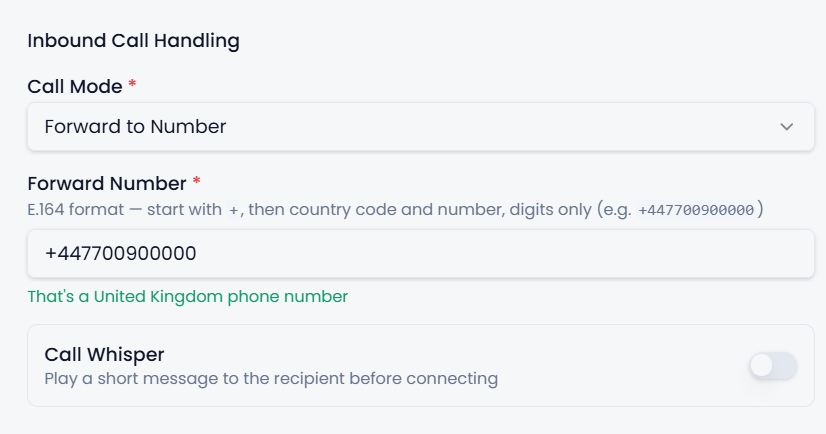
- Under Inbound Call Handling, set Call Mode to Forward to Number.
- Enter the Forward Number in E.164 format, for example
+447700900123. - Save your changes.
The Configuration tab now shows an Override active message. This means the number uses its own settings instead of a shared configuration.
Set up forwarding with a shared configuration
A shared configuration lets several numbers use the same forwarding settings. You set it up once and assign it to each number.
- In the portal, go to Numbers → Configurations.
- Select an existing configuration, or create a new one.
- Under Inbound Call Handling, set Call Mode to Forward to Number.
- Enter the Forward Number in E.164 format.
- Save your changes.
Assign a shared configuration to a number
Assign a shared configuration to make a number follow its settings. Assigning it removes any per-number settings on that number.
- Go to Numbers and select the gear icon next to the number.
- Open the Configuration tab.
- Choose the configuration from the Saved Configuration drop-down.
- Select Assign.

Enter the forward number in E.164 format
The Forward Number must be in E.164 format: a plus sign, the country code, then the number without its leading zero, and no spaces. E.164 is the international numbering standard set by the International Telecommunication Union (ITU). Its February 2026 edition limits a full international number to 15 digits (ITU-T Recommendation E.164, 02/2026).
| Number as you dial it | In E.164 format |
|---|---|
UK mobile 07700 900123 | +447700900123 |
UK landline 020 7946 0123 | +442079460123 |
Irish mobile 087 xxx xxxx | +35387xxxxxxx |
The most common mistake is keeping the leading zero, for example +4407700900123. Remove it after the country code.
Call forwarding pricing
Forwarded calls cost from £0.05 a minute, depending on the country and type of number you forward to. Calls are charged in 1-minute increments, rounded up to the nearest £0.05, and more than 150 international destinations are supported. See virtual call pricing for the rate for each destination.
| Example call | Minutes charged | Cost at £0.05 a minute |
|---|---|---|
| 45 seconds | 1 | £0.05 |
| 3 minutes 20 seconds | 4 | £0.20 |
| 10 minutes exactly | 10 | £0.50 |
Call whisper, the welcome message, text-to-speech, missed call alerts, and the call log are free. Calls you receive in WhatsApp are made in the app, so they are not charged as forwarded minutes.
View your call log and costs
The call log shows every call to your gosimless numbers, including what each call cost. Open it for all your numbers at once, or for a single number.
| To see calls for | Go to |
|---|---|
| All your numbers | Numbers → Calls |
| One number | Numbers → gear icon next to the number → Calls tab |
Both views have the same two tabs.
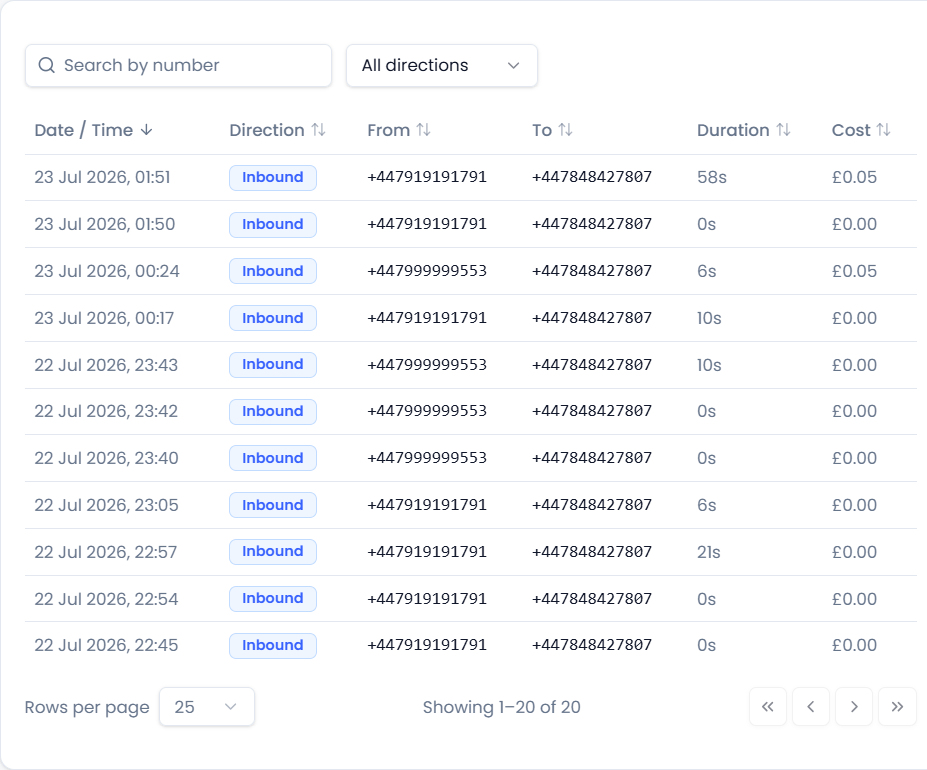
Table tab: lists each call, and you can search by number. Each call shows:
| Field | What it shows |
|---|---|
| Date/time | When the call was made |
| Direction | Which way the call went |
| Status | The outcome of the call |
| From | The caller's number |
| To | The gosimless number they called |
| Duration | Length of the call, in seconds |
| Cost | What the call was charged |
The Status field shows what happened to each call:
| Status | Meaning |
|---|---|
completed | The call connected and then ended. |
failed | gosimless could not connect the call. |
busy | The destination number was busy. |
no-answer | Nobody answered at the destination number. |
canceled | The call was cancelled before it completed. |
dropped | gosimless could not route the incoming call, for example because the number was not active or forwarding was not set up. |
autoresponse | The call was answered automatically with a welcome message. |
blocked | The call was identified as spam and blocked. |
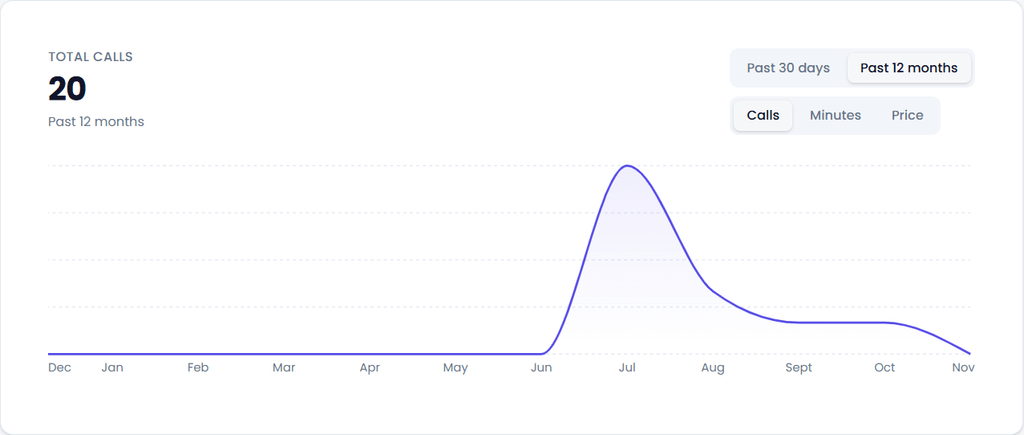
Chart tab: shows a line chart of your calls over the past 30 days or the past 12 months. Choose whether it shows the number of calls, the minutes, or the price.
Forwarding or a welcome message
Forward calls when callers need to speak to you. Choose a free welcome message when you do not answer calls on that number: callers hear a short greeting, such as "please message us on WhatsApp", and then the call ends.
Unanswered calls lose callers quickly. In a YouGov survey of 2,046 UK adults for Answer4u, carried out in June 2026, 37% said they would give up on a business call within 60 seconds and contact a competitor. Only 6% said they would leave a voicemail, and 24% would switch to another way of getting in touch (Answer4u and YouGov, 16 June 2026). Forward calls to a phone you will answer, or use a welcome message to tell callers where to go instead.
| Call forwarding | Welcome message | |
|---|---|---|
| What the caller gets | Your phone rings | A spoken greeting, then the call ends |
| Cost | From £0.05 a minute | Free |
| Call whisper | Optional | Does not play |
| Good for | Numbers where callers need to reach you | WhatsApp-only numbers, closures, numbers you do not answer |
To stop forwarding, open the number or shared configuration, and change Call Mode under Inbound Call Handling from Forward to Number to the welcome message.
Test the setup
Call your gosimless number from a different phone, not the one you forward to. Check that your Forward Number rings, that you hear the call whisper if it is on, and that you can hear the caller. If you use a shared configuration, test one number from each configuration after every change.
Frequently Asked Questions
Can I forward calls to a number outside the UK?
Yes. gosimless forwards to more than 150 international destinations. Enter the number in E.164 format with its country code, for example +353 for Ireland. The per-minute rate depends on the destination, so check virtual call pricing before you set it up.
Can I forward one number to two phones at once?
No. Each number or shared configuration has one Forward Number. To reach a different person, change the Forward Number, or give each person their own gosimless number forwarding to their phone.
How do I change the number calls forward to?
Edit the Forward Number where forwarding is set. For a number with Override active, change it on that number's Configuration tab. For a shared configuration, change it under Numbers → Configurations, which updates every number assigned to it.
What does "Override active" mean?
The number uses its own per-number settings instead of a shared configuration. Changes to shared configurations do not affect it. To make the number follow a shared configuration again, choose it from Saved Configuration and select Assign, which resets the override.
How do I stop forwarding calls?
Change Call Mode under Inbound Call Handling from Forward to Number to the welcome message. Callers then hear your greeting and the call ends. A welcome message is free, so there are no forwarded minutes to pay. See welcome message.
Am I charged for WhatsApp calls to my number?
No. Calls you receive in WhatsApp go through the app, not through call forwarding, so they are not charged as forwarded minutes. Only phone calls that gosimless forwards to your Forward Number are charged, from £0.05 a minute.
Will I know if I miss a forwarded call?
Yes. gosimless sends a missed call email alert when an inbound call is unanswered or fails, so you know someone tried to reach you. You can then call back or reply on WhatsApp.
How do I check how much forwarding is costing me?
Open Numbers → Calls, select the Chart tab, and show the price over the past 30 days or 12 months. To see what a single call cost, use the Table tab and search for the number. For one number only, use the Calls tab on that number instead.
Should I turn on call whisper?
Turn it on if several numbers forward to the same phone, so you know which number the caller dialled. Turn it off when you expect a verification or two-factor authentication call, because the whisper can delay the code. See call whisper.
Why does my phone not ring when someone calls?
Check that Call Mode is Forward to Number, and that the Forward Number is in E.164 format without the leading zero. Then check the destination phone has signal and is not set to reject or divert calls. Test from a different phone, not the one you forward to.
SMS Forwarding
Forward texts from your gosimless mobile number to email for free, per number or with a shared configuration. Every text is also saved in the portal.
Call whisper
Call whisper plays a short announcement to you before a forwarded call connects, so you know which gosimless number was dialled. Free to use.