
View and download invoices
Invoices and receipts for an organisation are in portal.gosimless.com at Billing, then Invoices (/billing/invoices). Each row shows the invoice ID, status, frequency, total, due at, paid at, and created at. Download on a row saves the invoice only. Select View to download the invoice or the receipt. You receive an email when a payment fails and when an invoice is due.
Where to open invoices and receipts
The invoice list is the place to see and download bills for the organisation you have selected, at Billing, then Invoices (/billing/invoices). A superadmin can access invoices and receipts for any organisation. An admin can access them for an organisation they are assigned to. A member can view and download invoices and receipts.
- Sign in at portal.gosimless.com
- Select the organisation if the account has more than one. See Organisations
- Select Billing from the menu, then Invoices
- Find the row by invoice ID, status, or date
- Choose Download for the invoice PDF, or View to open the page where you can download the invoice or the receipt
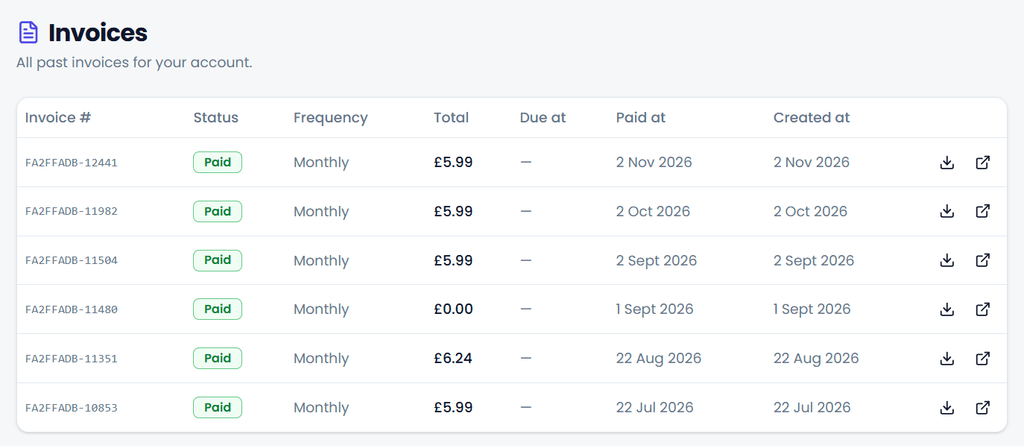
What each column means
Each invoice row tells you the reference, the payment state, how often that charge repeats, the amount, and three dates: when it was created, when it is due, and when it was paid. Read the row for the organisation you selected. Totals are the amount for that invoice, in the currency charged.
| Column | What it tells you |
|---|---|
| Invoice ID | The reference for this bill. Quote it if you contact gosimless about the charge. |
| Status | Draft, unpaid, past due, or paid. See the status section for what to do. |
| Frequency | The billing cadence for the charge, such as monthly, quarterly, or annual on a subscription. |
| Total | The invoice amount, including any tax that was applied. |
| Due at | When payment is due. |
| Paid at | When payment succeeded. Empty while the invoice is unpaid. |
| Created at | When the invoice was created. |
| Download | A PDF of the invoice only. |
| View | Opens the page where you can download the invoice or the receipt. |
Subscription billing on gosimless can be monthly, quarterly, or annual. Frequency on the row matches the subscription that produced the invoice. Call usage appears as a separate line item on the virtual number subscription invoice.
What the invoice statuses mean
The portal shows invoice status so you can see whether a bill is still being prepared, waiting for payment, overdue, or paid, and the label on the row is the one to act on.
| Portal status | What it means | What you should do |
|---|---|---|
| Draft | The invoice is not final. Most details can still change before the invoice is issued. Nothing is due yet. | Do not pay it. Wait until it is issued. If a draft looks wrong, contact hello@gosimless.com with the invoice ID before it is finalised. |
| Open | The invoice is finalised and awaiting payment. The due date may still be ahead. | No action required, payment will be attempted automatically. |
| Unpaid | Automatic collection has stopped. The subscription is scheduled for deletion, and the services are due to be disconnected. | Open the invoice from the row and complete payment or contact hello@gosimless.com if support is required. Do not wait for another automatic charge attempt. |
| Past due | The invoice is overdue, and gosimless is still attempting to collect the payment automatically. Service is disrupted while it stays past due. eSIM network connectivity is barred. Virtual numbers stop receiving regular calls and SMS, because call and SMS forwarding is disabled. | Open the invoice from the row and complete payment or update the payment method if the card failed, so the next automatic attempt can succeed. |
| Paid | Payment has been collected. Paid at shows when. | No payment is due. Download the invoice or the receipt and keep it for your records. |
| Uncollectible | The invoice has been written off as unlikely to be paid. It is not a request to pay again. | Do not pay it unless gosimless confirms it should be reopened. Email hello@gosimless.com with the invoice ID if you think it was marked this way by mistake. |
| Void | The invoice was cancelled. It is not payable, and it stays on the list as a record. | Nothing to pay. Email hello@gosimless.com with the invoice ID if you think the cancellation was a mistake. |
What to do when a payment fails or an invoice is overdue
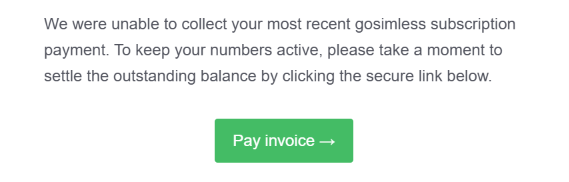
You receive an email when a payment fails and when an invoice is due. The email includes two ways to settle it before the virtual number or eSIM is disconnected. Use either method. You do not need to do both.
Pay the invoice
From the email
- Open the failed-payment email
- Select the link to the invoice
- Complete the payment on that page
From the portal
- Sign in at portal.gosimless.com
- Open Billing, then Invoices (
/billing/invoices) - On the Unpaid or Past due row, select View
- Complete the payment on that page
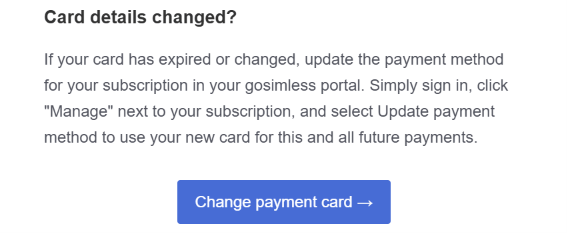
Update the subscription payment method
From the email
- Open the same failed-payment email
- Select the link to update the payment method for that subscription
- Enter the new card and save it
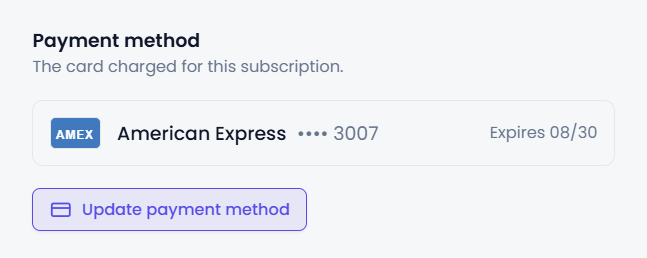
From the portal
- Sign in at portal.gosimless.com
- Open the subscription from the dashboard, or from the Numbers or eSIMs pages
- Select Manage on that subscription
- Update the payment method linked to the subscription and save it. See the Payment method guide for further information

A Draft row is not a failed payment. A Paid row needs no further payment. If you have already paid and the status is still unpaid or past due, wait for the row to show Paid and a paid-at time, then contact gosimless with the invoice ID and proof of payment if it does not update.
While an invoice is Past due, gosimless is still attempting to collect the payment automatically, and the service is disrupted. eSIM network connectivity is barred. Virtual numbers stop receiving regular calls and SMS, because call and SMS forwarding is disabled. When the status is Unpaid, those attempts have stopped. The subscription is scheduled for deletion, and the services are due to be disconnected permanently.
Who can view and download invoices
Superadmins can view and download invoices and receipts for every organisation on the master account, and admins can do the same for organisations they are assigned to. Members can view and download invoices and receipts too. They cannot change cards, pay an invoice, or edit billing details.
Finance staff who must change cards or settle failures need to be set up as admin users. An accountant who needs copies can be set up as a member user and can view and download the invoices and receipts. A member user is appropriate when they must not add connections or edit billing information.
Invoices stay with the organisation that was billed. Switching organisation changes which list you see. Invoices for a cancelled subscription still appear on that list. gosimless typically stores customer invoices and receipts for 5 years.
How invoices relate to organisations and subscriptions
Each invoice belongs to one organisation and to one product. Virtual numbers and eSIMs use separate subscriptions, so their invoices are split the same way. A virtual number invoice covers that virtual number subscription. An eSIM invoice covers the eSIM subscription. Call usage appears as a separate line item on the virtual number subscription invoice.
Frequency reflects the subscription cadence when the invoice is for a recurring plan, and the payment method charged is the card assigned to that subscription. Create and cancel subscriptions on the subscription cards on the dashboard, or on the Numbers or eSIMs pages. An invoice is the bill that follows. Cancelling a subscription stops future bills. Invoices already issued for that subscription still appear on this list.
Changing billing details updates the organisation's name, contact number, email, and address for later invoices. It does not mark an unpaid invoice as paid, and it does not change the details of past invoices.
If you run several organisations, check the organisation name before you pay or forward a PDF. The invoice ID is unique. Quote it in the subject line when you email hello@gosimless.com.
Frequently Asked Questions
Do we need to pay a draft invoice?
A draft is not final, so there is nothing to pay and the total can still change. Wait until the status moves to unpaid or past due, then pay or allow the card on file to be charged. If you can see drafts in the portal and one looks unexpected, email hello@gosimless.com with the invoice ID while it is still draft. It is not yet confirmed that every customer can see draft rows.
What is the practical difference between unpaid and past due?
Past due means gosimless is still collecting automatically, and the service is disrupted. eSIM network connectivity is barred. Virtual numbers stop receiving regular calls and SMS because call and SMS forwarding is disabled. Unpaid means collection has stopped, the subscription is scheduled for deletion, and disconnection is permanent. Pay the invoice or update the payment method while it is past due. If it is already unpaid, pay the invoice, update the card, or email hello@gosimless.com.
What should we do first when an invoice is past due?
While the invoice is past due, eSIM connectivity is barred and virtual number call and SMS forwarding is disabled. Open Billing, then Invoices, and pay the invoice or update the payment method so the next automatic attempt can succeed. Read the failed-payment email for the same two links. Contact hello@gosimless.com with the invoice ID if you have paid and the status does not move to paid.
Where is the receipt after an invoice is paid?
When status is paid, Paid at shows when the payment succeeded. Download on the row saves the invoice only. Select View, then download the receipt from that page. Invoices and receipts are different documents. You do not need to pay a paid invoice again.
Will a failed payment disconnect the number immediately?
When an invoice is Past due, the service is disrupted while gosimless keeps trying to collect. eSIM network connectivity is barred. Virtual numbers stop receiving regular calls and SMS because call and SMS forwarding is disabled. If the invoice stays unpaid, the subscription is scheduled for deletion and the virtual number or eSIM is permanently disconnected. That typically takes two weeks. Pay the invoice or update the payment method within that time.
Why is the total higher than the plan price on the website?
The total is the amount on that invoice, which includes call usage as well as the plan price. Virtual number charges and eSIM charges are on separate invoices, because those products use separate subscriptions. Call usage appears as its own line item on the virtual number invoice. Compare the PDF line items with the plan you bought. If a line is unfamiliar, quote the invoice ID to hello@gosimless.com.
Can our accountant get copies without a portal login?
An accountant who should download copies needs a member login. Members can view and download invoices and receipts. Someone with no portal login can receive the PDF from an admin, the superadmin, or a member who downloads it and sends it on. Keep the organisation billing email on a mailbox finance can open, because failed-payment emails go there. See Billing information.
Can we put a purchase order or VAT number on the PDF?
The invoice list shows ID, status, frequency, total, and dates. It does not show a purchase-order field. Billing details has no VAT number field. Name there is the company name. If a VAT number or PO must appear on the PDF, email hello@gosimless.com with the organisation and the text that must appear. Do this before the invoice is finalised if it is still draft.
Which organisation's invoices are in the list?
The list is for the organisation currently selected under the master account. A superadmin can reach every organisation's invoices. Admin and member users can reach invoices and receipts for organisations they are assigned to. The invoice itself should carry that organisation's billing details.
What does frequency mean if the charge is usage?
For a subscription, frequency is the billing cadence: monthly, quarterly, or annual. Call usage appears as its own line item on the virtual number subscription invoice, and that row keeps the subscription's frequency. Use the PDF line items and the total to see what was billed.
How do we get invoices after a subscription is cancelled?
Open Billing, then Invoices, on the organisation that held the subscription. Invoices already issued for a cancelled subscription still appear on that list. Cancellation stops future bills. gosimless typically stores customer invoices and receipts for 5 years. Download the invoice from the row, or select View for the receipt. See Subscriptions for the cancellation steps.