
Request an eSIM swap
An eSIM swap gives you a new profile for an eSIM you already have. Request one when you need to register that eSIM on a new phone, or on the same phone after the profile was deleted. Email hello@gosimless.com with the mobile number. gosimless sends the new profile within one business day. The previous QR code will not work again. The mobile number and the tariff stay the same.
How to ask for the swap
Send the request by email. The portal does not have a swap button. Include the mobile number of the eSIM that needs the new profile, so gosimless can match the request to the right connection. If the account has more than one eSIM, the number is what separates them.
- Email hello@gosimless.com.
- Ask for an eSIM swap.
- Include the mobile number of the eSIM that needs a new profile.
- Keep the subscription active while you wait.
gosimless replies with the new profile within one business day. One business day means the next working day, so an email sent late, or over a weekend, is answered on the following working day.
Where to find the new profile
The new profile arrives by email, and the same profile is placed on the connection in the portal. Either copy is the one to install. The QR code and the LPA URI are two ways to install that same profile. The LPA URI is the text address, for a phone that asks you to paste a link instead of scanning.
- Sign in at portal.gosimless.com.
- Open eSIMs.
- On the connection, select the gear icon.
- Open the Details tab.
- Use the QR code or the LPA URI shown there.
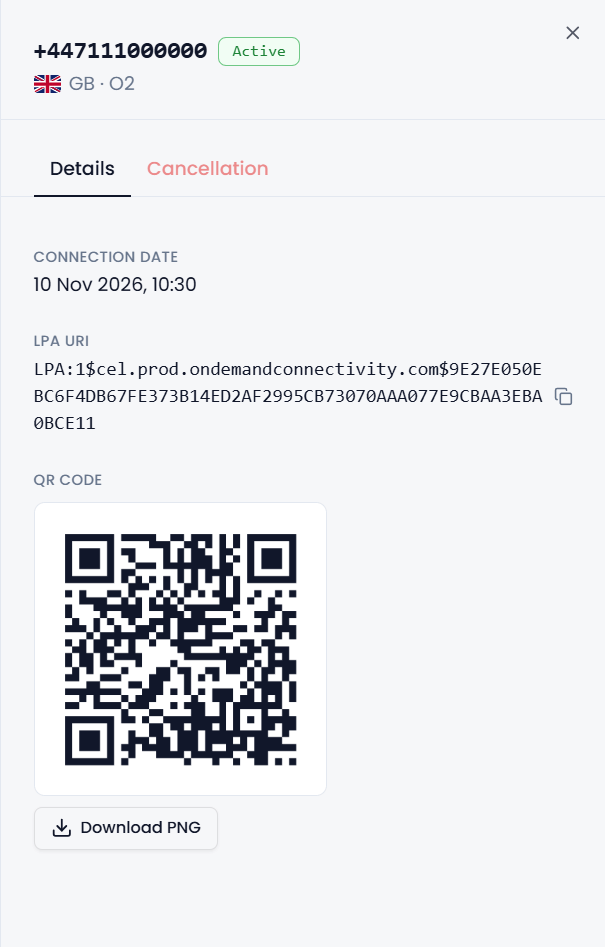
A member can open the Details tab. Members have read-only access, which is enough to view the QR code and the LPA URI. Roles are set out in Users.
Delete the old profile, then install the new one
Delete the existing gosimless profile from the phone before you install the new one. Do this on the phone that still has the old profile, including a phone you are about to stop using. The new QR code and LPA URI are for a fresh install. They do not overwrite a profile that is already on the device.
When the new profile is in your inbox or on the Details tab, delete the old profile, then install the new one from the new QR code or the LPA URI. Do not scan the QR code from the original order.
What stays the same
The mobile number stays the same, and the tariff stays the same. You do not choose a new plan, and you do not go through checkout again. The eSIM remains the connection already on the subscription.
Apps that use the number, such as WhatsApp Business, keep that same number. If an app asks you to verify again after the line is back on the phone, verify with this number. You do not register a different one.
When to request an eSIM swap
Request an eSIM swap when the profile has to be installed again. That covers a new phone, and a phone you already use if the gosimless profile was deleted from it. The connection stays on your subscription while you wait. You are asking for a new profile for that mobile number, not for a new plan.
A swap is the right request when the line itself is fine and only the profile on the phone is missing or stuck on the wrong device. If you no longer want the number, follow Disconnect eSIM. If you want to move the number to another provider, follow Porting. Neither of those is a swap.
Why the previous QR code will not install
Each QR code is single-use, for security. A code that has already been used to install the profile will not install it again, including the QR code from the original order email. Scanning it on a new phone, or on the same phone after you deleted the profile, does not bring the line back.
The replacement is a new profile, with a new QR code and a new LPA URI. Use only the profile gosimless sends after you request the swap. Keep that email, or open the Details tab in the portal, until the profile is installed.
Frequently Asked Questions
I deleted the profile and the phone has no service. Is the number gone?
The number is still on the subscription. Deleting the profile from the phone removes it from that device only. Email hello@gosimless.com and ask for an eSIM swap for that mobile number. gosimless sends a new profile within one business day. Do not select Disconnect eSIM. That releases the number permanently. See Disconnect eSIM.
Can I leave the profile on my old phone and install it on the new one as well?
The profile has to be removed from the old phone before it is installed on the new one. A second install needs a new profile, and the previous QR code will not do that job because it is single-use. Request the swap, wait for the new QR code or LPA URI, delete the profile on the old phone, then install on the new phone.
I still have the QR code from the day I ordered. Can I use that?
That QR code has already been used, so it will not install the profile again. Each code is single-use for security. Request an eSIM swap and install only the new QR code or LPA URI, from the reply email or from the Details tab. Scanning the original code on a new phone does not move the line.
Should I use the QR code or the LPA URI?
Use either. Both belong to the new profile. Scan the QR code when the phone can use the camera. Paste the LPA URI when the phone asks for a link or a code instead of a scan. They are on the Details tab, and the same pair is in the email gosimless sends. You only need one of them.
I have more than one eSIM. Which number do I put in the email?
Put the mobile number of the connection that needs the new profile. That is the number on the eSIM, not the plan name. O2 and Vodafone connections on the same subscription are separate profiles. A number in the email is what tells gosimless which connection to swap. The other eSIMs stay as they are.
Will the swap change my price or my renewal?
The tariff stays the same. You do not pick a new allowance, and you do not check out again. The connection stays on the subscription it is already on. Adding a further eSIM is a different action and can reset the billing cycle. That is covered in Add eSIM. A swap does not add a connection.
Is a swap the same as moving my number to another network?
A swap keeps the number on gosimless and replaces the profile on the phone. Moving the number to another provider is a port out. For a port, email hello@gosimless.com for a PAC while the eSIM is still active, and follow Porting. Do not disconnect the eSIM first. A swap does not issue a PAC and does not release the number.
WhatsApp is asking me to verify again. Do I need a new number?
Use the same mobile number. The swap does not change it. If WhatsApp Business asks for a code after the profile is installed again, verify with this number, by SMS or by the voice call, in the same way you did when the line was first set up. You do not request a different gosimless number for that check.
A member cannot change the eSIM. Can they still request a swap?
The request is an email to hello@gosimless.com, so it is not a portal action. Include the mobile number. Once gosimless has added the new profile, a member can open eSIMs, select the gear icon, and read the QR code and LPA URI on the Details tab. Members are read-only. An admin or the superadmin is only required for changes such as adding or disconnecting an eSIM. See Users.
It is past one business day and I have no new profile. What should I do?
Reply to your email, or write to hello@gosimless.com again, and include the same mobile number. One business day is the next working day, so a request sent on a Friday is due on Monday. Check the Details tab as well as the inbox, including junk mail. The profile is sent by email and shown in the portal.
Disconnect eSIM
Disconnect one eSIM from its subscription. The number is released immediately and cannot be reconnected. Email for a PAC first if you need to keep the number.
Porting
Bring a mobile number onto a gosimless eSIM, or take an eSIM number to another provider. Porting is free. Ask for a PAC before you disconnect.